
Qik Start Guide:
Add Age Verification to Your Website
Add age verification to any website with a single script tag. No APIs, no backend work. Go live in under 5 minutes with QikChek's end-to-end compliance solution.
End-to-End Age Verification Compliance, Handled
Unlike raw APIs that force you to build your own UI and routing logic, our lightweight script is a complete solution that automatically takes care of the heavy lifting:
1 Add the Age Verification Script
Add the QikChek script to your site, preferably inside the <head> tag. You can find your unique script tag inside the QikChek dashboard.
<script src="https://cdn.qikchek.app/site/hosted.js" data-site-key="YOUR_SITE_KEY"></script>Configuration Attributes
| Attribute | Status | Description |
|---|---|---|
| data-site-key | Required | Your unique public identifier from the QikChek dashboard. |
Make it your own
Depending on your plan, you can customize the look and feel of the hosted prompt without writing any extra code. Head to the Customize page in your QikChek portal to upload your company logo, edit the secondary title and support text, or add a custom "Create an Account" link (ideal for creator platforms where users already submit identity documents during onboarding).
2 Choose Where It Runs
Option A: Entire Site
Include the script globally across your entire site. This is the fastest setup.
- Visitors prompted instantly if required
- Granted temporary access upon success
- Exclude specific pages directly from the dashboard
Option B: Session-Based
RecommendedConditionally render the script in your global header so it only loads for unauthenticated guests.
- Wraps easily inside your existing auth logic
- Logged-in users never load the age gate
Important Note on Temporary Access
After completing verification, users receive temporary browsing access (no account required). This allows them to safely explore your content and decide to purchase before hitting a hard paywall or login screen.
Implementation Hint
These snippets demonstrate how to conditionally render the script so it only triggers when a user is not logged in. Because QikChek is just a front-end script, this exact logic can be easily applied using any dynamic web language or framework (Python, Ruby, Go, C#, etc.).
<!-- Only render the script if the user session is empty -->
<?php if (!$logged_in): ?>
<script
    src="https://cdn.qikchek.app/site/hosted.js"
    data-site-key="YOUR_SITE_KEY">
</script>
<?php endif; ?>
<!-- Only render the script if the user object is missing -->
<% if (!user) { %>
<script
src="https://cdn.qikchek.app/site/hosted.js"
data-site-key="YOUR_SITE_KEY">
</script>
<% } %>3 How the Verification Flow Works
1. Location Detection
QikChek instantly detects the visitor's region to determine if local verification laws apply.
2. Rule Evaluation
We check your dashboard rules. You decide which regions strictly block traffic, and which require active age-gating.
3. QikFlow Engine
If permitted, QikFlow uses instant facial age estimation to reduce friction. It only escalates to a full ID scan if confidence is low or laws strictly require it.
4 What Your Users See
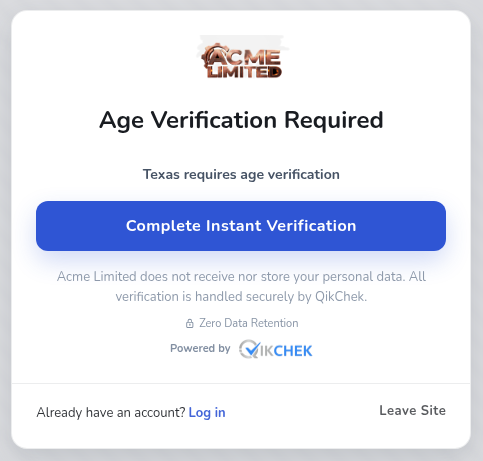
We know conversion rates matter. QikChek presents a beautiful, mobile-optimized prompt that cleanly alerts users when age verification is required in their region. Depending on your plan, you can fully customize this overlay's branding and messaging to match your site. From here, users are given clear options to proceed to the secure verification page, log in to an existing approved account, or safely exit.
-
Clear Routing Options Users are never trapped. They are presented with straightforward buttons to verify their age, log in, or leave the restricted content.
-
Brand Matching The modal automatically displays your logo, ensuring users feel they are still interacting directly with your business before being securely redirected.
-
Light & Dark Modes The modal comes in both light and dark themes, which you can easily configure in the customer portal to seamlessly match your site's aesthetic.Try it:
-
Built-in Trust Displays clear privacy reassurances and zero-retention badges so your users feel completely safe clicking through to complete the check.
That's it. Your site is age-verified.
Once the script is installed, your site is actively defending against compliance violations. You can refine your geo-rules anytime from the dashboard.